This is my first post about AI. I had to start sometime right? This post is about building your own AI Intune Assistant with Microsoft Foundry. It is based on the idea that you won’t need Security Copilot if you learn to use some tools…
Let’s dive in!
This is what we are configuring:
We setup a Microsoft Foundry, and we create a logic app + API connection as an MCP server to connect to a storage account. After that, the Microsoft Foundry is able to read the storage account containers which holds a managed devices report and an export of our Intune policies. We then ask some questions about this content.
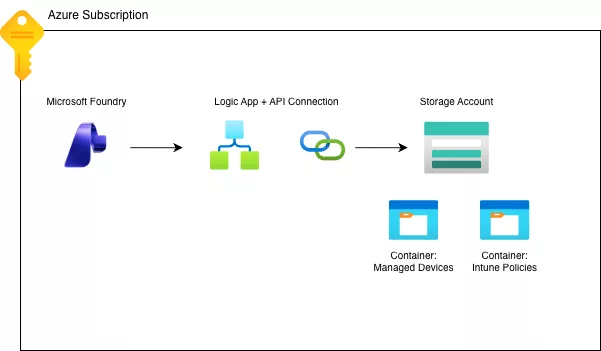
Prequisites:
- Azure Suscription
- Azure Storage Account
Setting up the Foundry and connecting a storage account
Firstly, we must setup a Microsoft Foundry. This is where you setup an LLM to talk to.
Look for Microsoft Foundry in the Azure Portal:

After that, click create:

Fill out all the basic stuff, resource group, name, region etc.
Note: pick a region that supports agents wil tools! West Europe for instance does not, I use Sweden Central. Check the docs here.
After that, go to review and create, and create the Foundry:

As you can see, it’s a very basic setup.
After the deployment completes, go to the foundry resource, and click “Go to Foundry portal”:

Make sure the “New Foundry” toggle is selected:

We are now connecting an existing storage account to the Foundry so we can give it some information about our Intune environment.
Go to build and then select tools:


After that, click connect a tool:

Search for Storage blob and select Azure Blob Storage:

It creates a logic app resource as an MCP server for you, click Create a Logic Apps resource:

This will take a couple of minutes, next you get the questions what actions you want to select. I selected these:

I don’t want the agent to be able to create a shareable link to a blob. It might lead to data leakage. Furthermore, I don’t it to delete a blob and interact with the access policies.
Lastly, you connect it using a storage account access key:

A storage account connection is created:

Lastly, register the MCP server with these tools:

Next, it asks you to connect it to an agent or to create one. I create one called Intune Assistant:

So, what do we actually have after doing all this work? We can ask the intuneassistant agent:

Ask it to list the tools available:

You see that it can read the blob storage.
Using the Microsoft Foundry as an Intune Assistant
So, the next step is actually using this solution. I exported a couple of Intune policies and export the managed devices.

I will probably automate that in the future but just for testing purposes I manually exported this stuff. In the future it will do a daily export, and an on demand or triggered by changes export.
After we exported the data we can ask the agent some questions about the data. First time the agent accesses the storage account, it asks for permissions:

I approved it for this tool. After that, I ask about a specific policy which contains hardening settings for Windows 11.
Prompt: “Can you check the hardening policy and how it compares to CIS 4.0 for Windows 11?”
This is what it replied:

And this is only my first try and I am using the GPT4.1 model because that is the highest available in my sponsorship subscription.
Let’s see what it says about my exported devices report.
Prompt: “There is also a containers called manageddevices. It contains a managed device report for Microsoft Intune. What can you tell about those devices and can you give me a recommendation on improvement?”

I deliberately have a bad report because I never cleanup devices in my test tenant exactly for these kind of test cases. The “Immediate Action Items” are quite interesting and are correct to what needs fixing.
There will probably a follow up post covering automation the export of the report and the policies. Maybe another one on publishing this agent to Microsoft Teams.
So, first testing with the Foundry look promising. You will probably be able to have a somewhat same experience as with Security Copilot. You can at least ask questions about your Intune Environment and get recommendations!
Costs
Well there is this not so smal Elephant in the room. Costs. We know that Security Copilot is quite expensive. It’s coming to the E5 suite but still you would need a minimum count of licenses and there are a lot of companies not utilizing this license.
So, looking at the costs in Microsoft Azure. You see that I deployed multiple foundries. One with an App Service and one without:

The App Service is the most expensive. The foundry is not not. This solution will cost you around 40-ish dollars a month? You need the expertise to build it, maintain it, and automate the exports etc. But, I think this might be worth it? Let’s see in the next parts.