I’ve done a couple of posts and speaking opportunities about App Control & Applocker. The general feedback was that everyone wanted to deploy these features but found it hard to deploy and maintain. What if I tell you that this could be made easy?
The challenge with App Control
The challenge with App Control is that it works really well. What do I mean by that? When something is not allowed, it does not run. Period. App Control is system wide. So, the user, administrator, and the system account can’t get around the policies. And, that is also the problem. You can’t just elevate your permissions to administrator and install an application for the user (like you can with Applocker).
Every time you want to exclude an application, executable, or unsigned DLL file, you must first figure out what is blocked. If you’re lucky and your company has Microsoft Defender for Endpoint (MDE) Plan 2, you can use the security portal and grab the MDE logs from a certain device. You can then grab those logs, import them into App Control Manager and create a policy:

After that, you still must upload the new policy to Microsoft Intune, test the policy and deploy it to all your machines. Imagine, if this is a non signed dll you must go through this process every time the application is updated. And, this is best case scenario for App Control. This scenario often takes hours!
If you are not so lucky, and most of you are, you first must grab the logs from the machine that has issues. The quickest way to do is to grab the diagnostics via Microsoft Intune. After that, you cross your fingers that device in question finishes the upload of the logs. After that, you can again use App Control Manager or the App Control wizard (by Microsoft) to create a new policy and go through the deployment scenario again. This scenario often takes even longer then the first one.
Also, imagine that you work at a big corporate organization with thousands of applications. This will keep you busy for sure. Lastly, you need multiple administrators with some level of expertise to keep this running, up to date and quickly resolve issues.
The solution for App Control Management
Last november I attended an event called E2EMVC. A company called AppVentiX hosted a session about their new features. One of those new features is App Control and it peaked my interest immediately. So, I went to the session and checked out the new features.
I think this really might be a solution for those who want to use App Control but find it hard to administer the policies and keep up with the business demands/updates.
Disclosure:I know the owner of the company AppVentiX but I do not get sponsored writing this post. Furthermore, this is my honest opinion and honest review of the software.
I want to peak your interest immediately also. So, let’s start with a screenshot of the software where I think the value shows immediately:
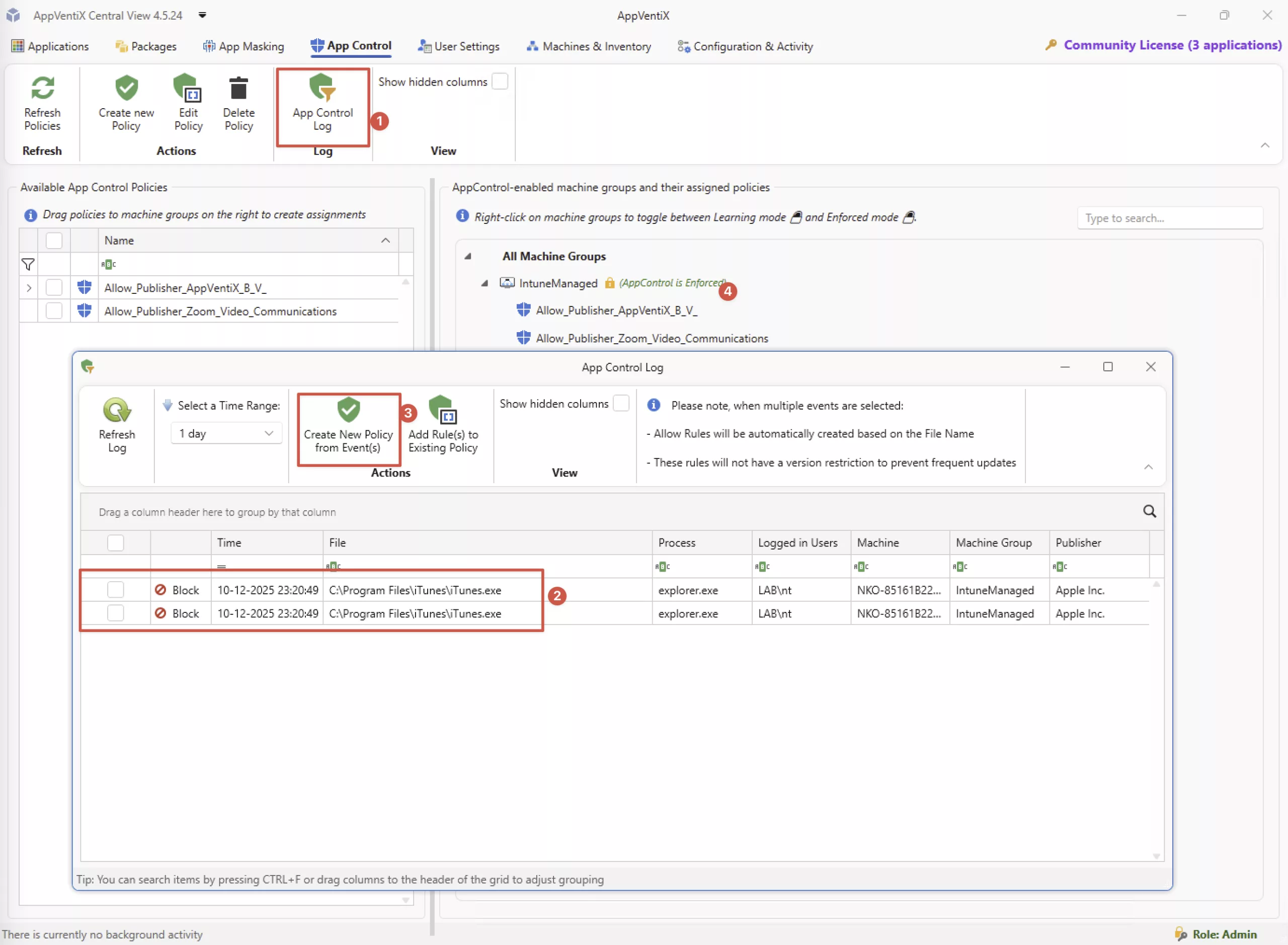
The console shows the App Control log from a machine where iTunes is blocked.
You’re 4 clicks away from creating a new policy and deploying it to your machines. (1) Shows the App Control from your machines. (2) Shows the actual events. (3) Creates a new policy. (4) Assigns the policy to your machine group. This took me only 30 seconds!
After that, you can Invoke a refresh cycle from the management console to the machine to apply the new policy directly or you can do it from the machine itself.
From the management console:

From the machine itself:

The sync only takes a matter of seconds!
How does AppVentiX work?
Let me explain how AppVentiX works. You have 3 components.
- A windows device where you install the console. This could be a management server for example.
- A file share, this can be a regular fileshare but this can also be an Azure fileshare. In my example deployment I used an Azure fileshare.
- The agent, this runs on the client device, you can deploy this via Microsoft Intune for example.
When you install the management software (youtube channel for the latest videos). It asks you to provide a fileshare. As said earlier, this can be a regular Windows Server fileshare or this can be an Azure fileshare.
After that, you create a machine group:

You enable App Control and set settings for checking the logs:

For testing purposes I set this 10 seconds and retain it for 1 day so I immediately see new events. You can set this is up however you want, for production I would increase the interval to the default of 1800 seconds. You can also have your SIEM index the logs to be able analyze these in a central location/solution.
I also created a logical overview to get a better idea of how this works:

So, the management server and the Entra Joined Client device only interact with the fileshare. Not with each other. Therefore, no extra ports opened in firewall etc. A friend of mine would say “super simpel”.
The policies applied really quickly. When you make a change via the centrale console it places an encrypted action on the fileshare. The agent on the client machine polls whether something must be done. If so, the agent reads the action, decrypts it, and executes it. That how you can deploy new policies in a matter of minutes.
Note: The example shows an Entra Joined device with an Azure File Share.You can also use a Windows Server fileshare with Active Directory domain joined machines. You can also use AppVentix to centrally manage your App-V & MSIX packages. This was the original purpose of the software.
Another note: AppVentIX now support QUIC over HTTPS. So, it doesn’t use port 445 to communicate to the Azure storage account. Some ISP’s block port 445 but AppVentiX has the QUIC solution for that.
Conclusion
To wrap up, I think that AppVentiX adds the piece of the puzzle where App Control gets manageable for the average IT admin. You have a central console where you can manage and deploy all the policies. You collect the logs in a central fileshare where you have an easy overview for what is blocked. When you view these logs you can create policies directly from those logs. Within 30 seconds you can easily create new App Control policies for your users.
The tools that Microsoft and the community offer still require a lot of work and expertise. AppVentiX helps a lot of admins to get App Control deployed and keep it deployed. I often see that App Control is deployed at the beginning of the project but was later disabled because it was not manageable. Or that there are a lot of complains because fixing an issue requires a specific expertise which is not available at anytime.
If you want to try this feature out yourself please reach out to AppVentiX. They help you get set up if needed. There is also a community license which you can use to test things. This is limited in functionality. So, if you need those functions, also reach out to App Ventix.
This feature is still in preview. AppVentiX expects to this release early 2026.
Other posts
Automate Applocker configuration for Intune
Intune Import Applocker Policy Script
Nice! Is it possible to set another managed installer like reacast with this tool.
Hi Dave,
You could check out the deployment certificates that recast uses and whitelist them easily from this tool. However, each application has it’s own code signing certificate… So, unless Recast signs everything with their own code certificate or integrates into App Control like the managed installer I don’t think this is possible.
Regards,
Niels
Hi Niels,
You always write great blogs like this on how to apply AppvenTiX. AppvenTiX is already familiar to us, and we are using it in this way as well. In your example, you refer to Entra Joined Client Devices accessing an Azure File Share. Are you referring to AVD machines here? Because for Microsoft Intune managed laptop devices, accessing Azure File Shares from outside Azure is not possible without a Microsoft VPN, since many ISPs block port 445.
Hi Jeroen,
Thanks for the compliment! I am lucky I don’t have such an ISP. So, I can access the fileshare when using an Intune Managed device. Maybe, Ziggo will stop blocking port 445 in the future. 🙂
You can also use this for AVD machines indeed!
Niels
Hey Jeroen. Did you know SMB over QUIC is an option? This overcomes the TCP/445 block as this just runs over the default TCP/443 port, it helps me with my demos as I completely run in Azure.
Updated the post!